A time budget that actually adds up

Spend your day on purpose.

Your day starts with 24 hours. Leeway subtracts your sleep, work, and routines, then shows the balance that's truly yours to spend — and warns you the moment a plan would overdraw it.

Free to start · No account · Your data stays on your device

The idea in ten seconds

Your day is an account.
Treat it like one.

Most planners let you pile on tasks until the day quietly breaks. Leeway runs your day on the clearest model there is — a balance — so you always know what's left.

01

You're paid 24 hours

Every day starts with the same balance: twenty-four hours. It's fixed, it's fair, and it never rolls over — which is exactly why it's worth spending with intent.

02

Commitments come out first

Set up sleep, meals, work, and the commute once. Leeway deducts them automatically, every day they recur — like fixed bills paid before you see your spending money.

03

What's left is yours to spend

The number that remains is your real free time — the figure at the heart of the app. Every task spends it. Drop or defer something, and the time is refunded on the spot.

SPENDGive time to a task or event SAVEDefer or drop it — get the time back EARNFinish early and keep the difference

The one thing no planner does

See it fit
before you say yes.

As you set how long something takes, today's balance updates in real time. If it wouldn't fit, Leeway tells you before you add it — and points you to the days that still have room. The overdrawn Monday never happens.

  • A live “left today after this” readout as you choose a duration
  • An honest warning the moment a plan would push the day negative
  • Nearby days suggested by how much each one has free

What you get

Everything you need to spend a day well.

A week you can rebalance

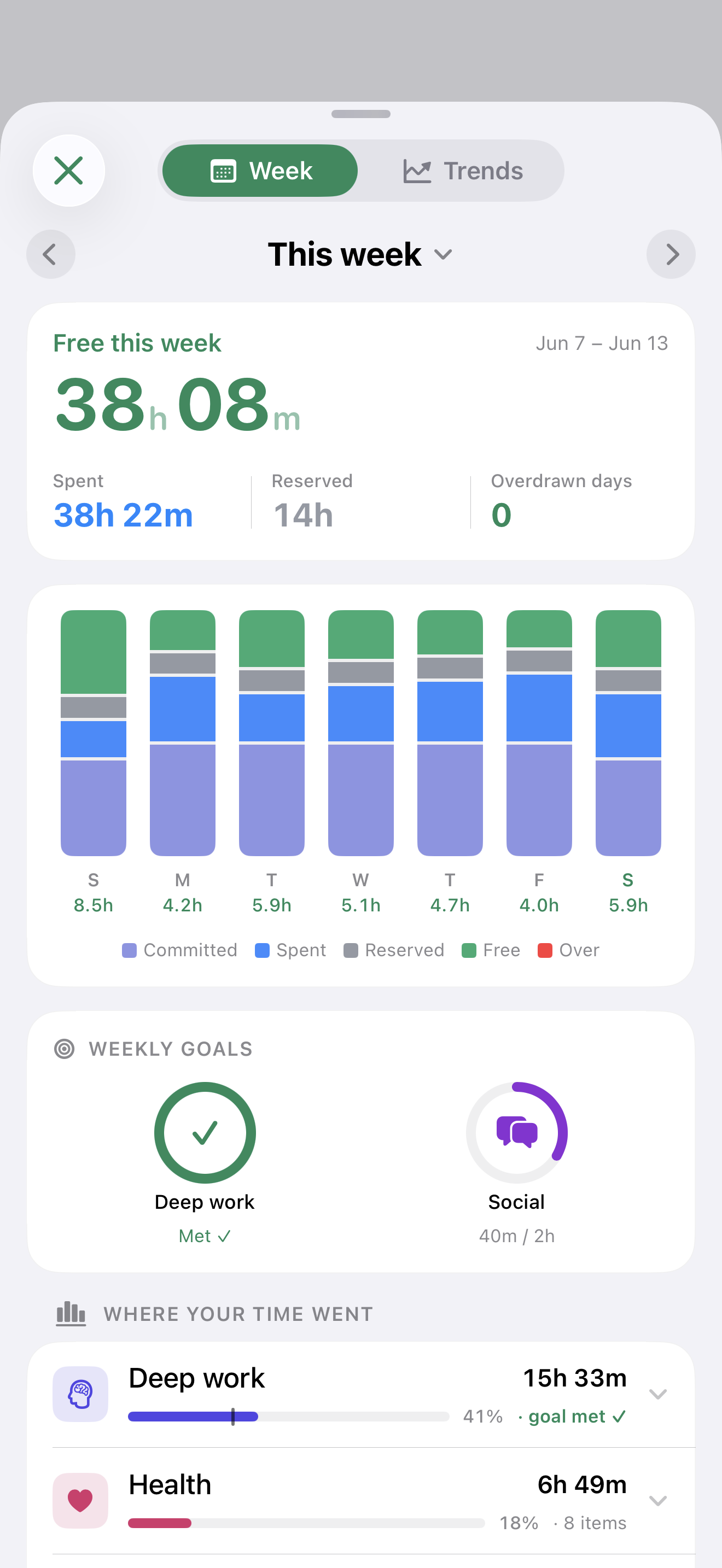
See all seven days stacked — committed, spent, reserved, free — with overdrawn days spilling red over the top. Then move time around: one tap shifts a task to a day that still has room.

Goals that hold the line

Set a floor for what matters — “2h of deep work a day” — and a cap for what drifts. Leeway tracks both against the time you actually spend.

Just say it

Speak naturally and Leeway picks out the task, the category, and how long it takes. Transcribed on-device — your voice never leaves your phone.

Focus that pays you back

Start a session and a live timer follows you to the Lock Screen and Dynamic Island. Finish under your estimate and the spare time is earned back into your balance.

Time earned & lost

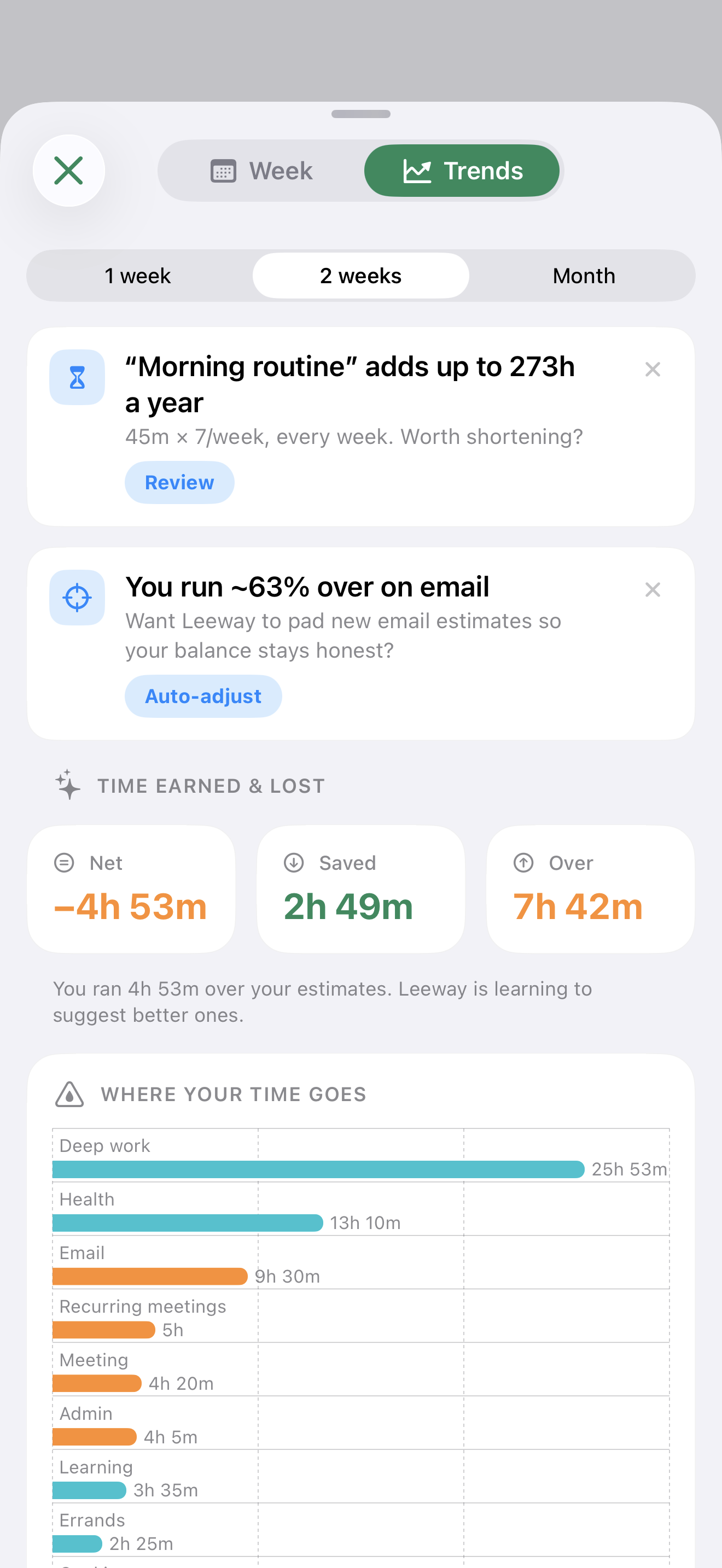
Trends show where your estimates run over, what you've clawed back by finishing early, and exactly where the hours go — clean numbers, no vanity charts.

Projects, milestones & your whole day

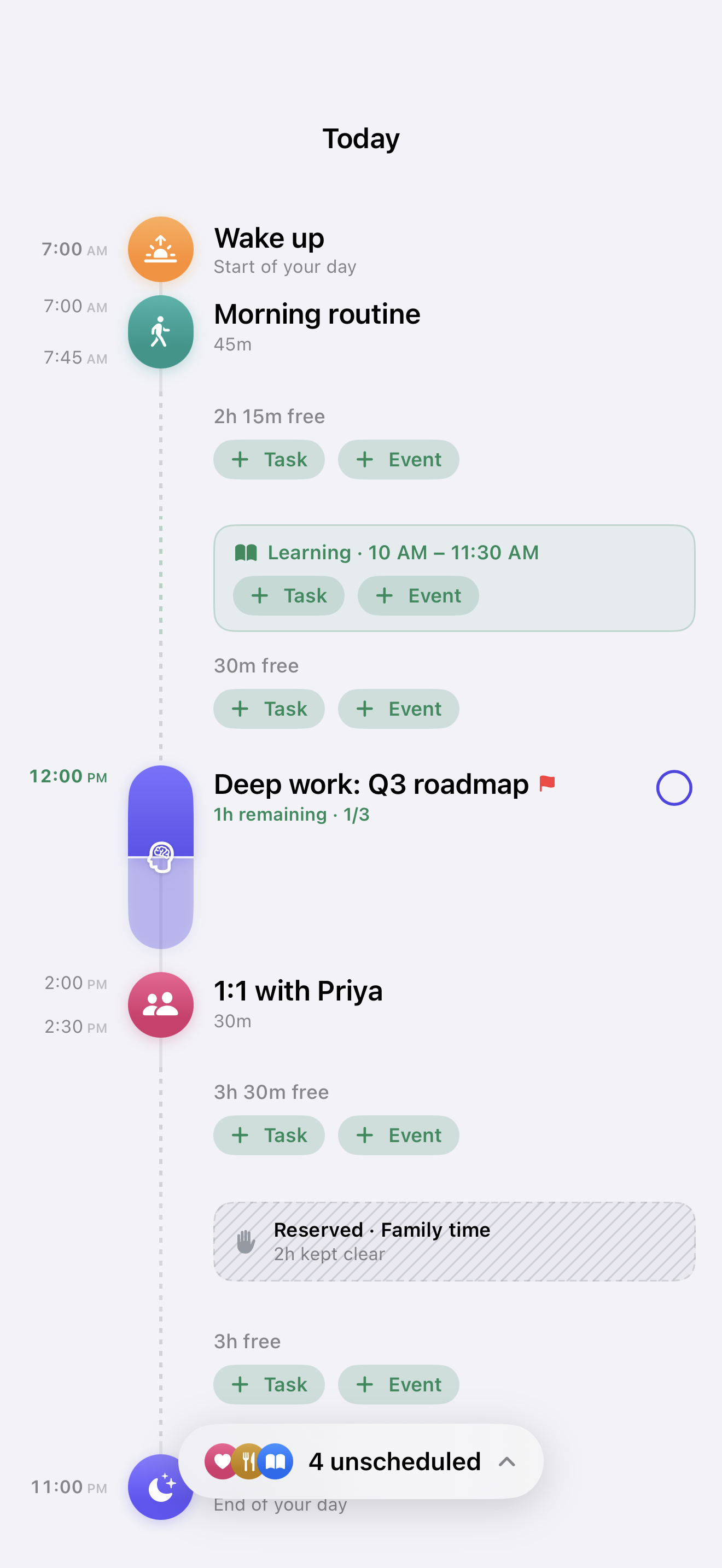
Group work into projects, mark the milestones that matter, and watch each one fund itself from your daily balance. Every plan also lands on a clean timeline — mapped wake to sleep, with the free gaps in between.

A closer look

Built native. Feels inevitable.

Drag to explore the real app — Today, your week, the timeline, trends, and projects.

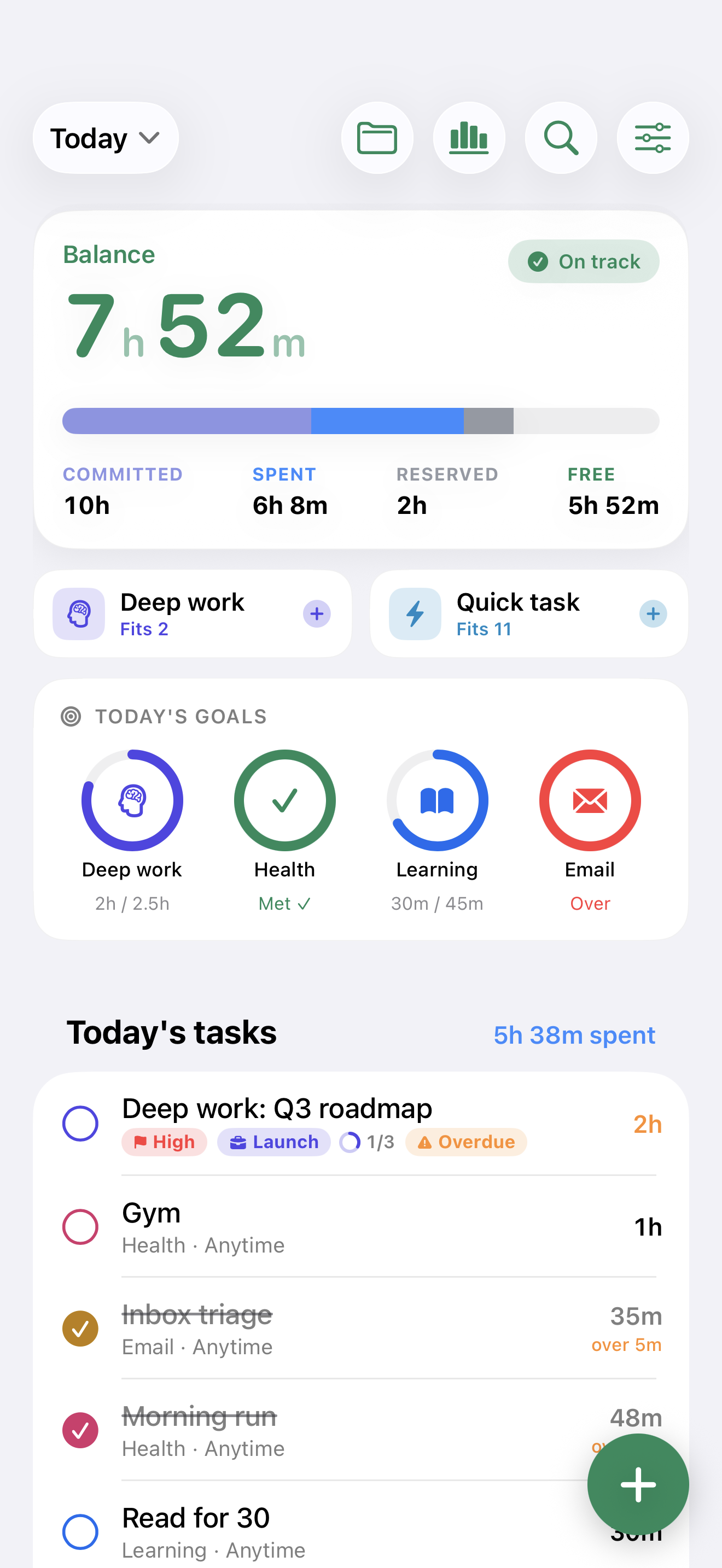
Today screen with the day's balance and tasks
Know where every hour goesYour balance, your goals, your day — at a glance.
Week view with seven balance columns
Design your week on purposeSpot the heavy days early and even them out.
Vertical day timeline from wake to sleep
See your whole dayA clear timeline, wake to sleep, with free gaps.
Trends with insights and time earned and lost
Spot your time patternsSee where it really goes — and what to fix.
Projects, each with hours left and a progress ring
Bigger goals, on trackGroup work into projects that fund themselves.

Wherever your day happens

One balance, every screen.

iPhone & iPadThe full app, built with SwiftUI
MacA true native Mac app — not a port
Apple WatchYour balance, a glance away on your wrist
Widgets & Live ActivitiesHome Screen, Lock Screen, Dynamic Island
Siri“Add 30 minutes of reading” — done
🌐24 languagesLocalized end to end

Privacy by design

Your hours are
nobody's business.

  • No account. Ever.Nothing to sign up for, so there's nothing to leak. Just open the app and start.
  • On your device, in your iCloud.Your data stays on-device and syncs through your own private iCloud database — we can't read it.
  • No ads. No tracking. No analytics SDKs.Nothing watching how you plan your life. There's no business model that needs it.
  • Voice stays home.Speech for quick capture is transcribed entirely on-device. The audio never leaves your phone.
Read the full privacy policy →

Pricing

The core is free. Forever.

Your daily balance, commitments, goals, the week review, the timeline, search, Siri, widgets, the Watch app, and iCloud sync — all free, with no time limit. Leeway Pro unlocks the power features.

Monthly

$1.99/month
  • Milestones
  • Unlimited projects
  • Voice capture
  • Custom categories
  • Trends & history
  • Themes & wallpapers
Get started
EARLY BIRD

Lifetime

$19.99once

Launch price — pay once, own it

  • Everything in Pro
  • All future Pro features
  • No subscription
Unlock lifetime

Prices in USD; local pricing applies on the App Store. Subscriptions renew automatically and are managed through your Apple Account. If Pro ever lapses, nothing breaks — everything you already made keeps working.

Good questions

Fair questions, straight answers.

How is this different from a to-do app or calendar?

A to-do list lets you add tasks forever and never says whether they fit. A calendar shows events but not what's left over. Leeway gives the day a balance — 24 hours minus your commitments — and updates it live while you plan, so an over-full day turns red on screen before it overwhelms you in real life.

Do I have to track or log everything I do?

No. Set up your recurring commitments once — sleep, meals, work, the commute — and Leeway deducts them automatically every day. After that you only add the things you choose to spend time on. It's a planning tool, not a stopwatch.

What happens when a day goes over?

The day shows an honest overdraft — red, spilling over the top of the bar. The week view then offers to rebalance: move a task to a day that still has room, in a single tap. Removing or deferring anything refunds its time instantly.

Does it work with my calendar and reminders?

Yes, optionally. Leeway can import timed calendar events as committed time and mirror tasks to Apple Reminders — all through Apple's own frameworks, all on your device. It works fully without calendar access too.

What's free, and what's Leeway Pro?

The whole core loop is free forever: the balance, commitments, goals, week review, timeline, search, insights, Siri, widgets, the Watch app, iCloud sync, and up to three active projects. Pro adds milestones, unlimited projects, voice capture, custom categories, trends & history, and themes — $1.99/month, $9.99/year with a week free, or $19.99 once.

Your next 24 hours
are already in the account.

Spend them on purpose.

iPhone · iPad · Mac · Apple Watch